Festival Builder Tycoon Galaxy Update Guide
Theme your skyline without sacrificing guest happiness.
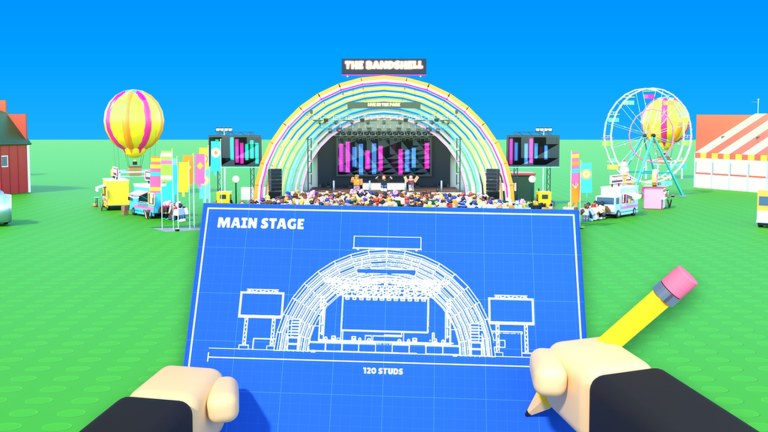
The Galaxy Update is the standout content wave for Festival Builder Tycoon builders who care about identity as much as throughput. It shipped a bundle of 31 new decorations, a cohesive Galaxy theme, and giant festival name letters you can plant as landmarks. This deep dive explains what changed, how to place the new kit without wrecking paths, and which wiki pages to revisit after you flip the theme switch. It is written for Convicted_Orange’s Festival Builder Tycoon - not Music Festival Tycoon or other similarly named Roblox festivals.
What the Galaxy Update adds
| Feature | Player impact |
|---|---|
| 31 new decorations | Fresh props for plazas, backdrops, and photo corners |
| Galaxy theme | Unified visual language across a district or whole plot |
| Giant festival name letters | Meetup landmark + brand flex for Festival of the Day |
Mechanically you still build stages, route guests, place food trucks, book bands and DJs, trigger reactive light shows, and chase five-star happiness. Galaxy content amplifies how that loop looks and feels, especially when lights react across a cosmic backdrop.
Why it matters for five-star nights
Guest happiness cares about comfort and clarity first. Galaxy props help when they:
- Make the entrance memorable so guests understand they arrived somewhere special.
- Frame the main stage so reactive light shows read clearly against the skyline.
- Create navigable landmarks (“meet at the letters”) in multiplayer sessions capped at four players.
Galaxy props hurt when they:
- Narrow primary lanes to the main stage.
- Hide food truck fronts.
- Turn side stages into obstacle courses during changeovers.
- Encourage you to delay S-tier stage upgrades just to buy every decor piece at once.
Use the Decorations Tier List alongside this article: core flow props stay S-tier; Galaxy statements sit at high A-tier when placed with discipline.
Build plan - install Galaxy in four passes
Pass 1: Protect the skeleton
Before opening the new catalogue, screenshot your working routes from spawn to main stage and to food. Mark cells you refuse to block. Recheck Stages priorities so the main stage and reactive lights remain funded.
Pass 2: Theme the entrance and main backdrop
Apply Galaxy theme pieces where cameras and guests naturally look: gate, main plaza edges, and behind the headliner - not in the middle of the mosh path. Plant giant name letters off the primary lane but still visible, so friends can rendezvous without standing in a queue (Players).
Pass 3: Selective prop density
You do not need all 31 decorations in the first hour. Pick a shortlist that reinforces one story (cosmic chill grove, neon galaxy VIP edge, orbital food court trim). Store the rest. Density without hierarchy reads as clutter - C-tier behavior on the decorations list.
Pass 4: Live night validation
Run a full booking with staggered times to avoid band schedule clashes. Watch guest clumps. If people stall at a new arch cluster, delete or shift props immediately. Finish with the Tools night-prep checklist before calling the rebuild done.
Reactive lights + Galaxy backdrops
Galaxy panels and sky props shine when reactive lights pulse during headliner peaks. Keep the backdrop behind performers, not between performers and the crowd. If lights feel muted, you probably over-layered opaque decor in the camera cone. Pull two props, retest one song cycle, and iterate. Show extras from optional Game Passes remain unnecessary until this free setup looks clean.
Festival of the Day and social flex
Galaxy identity helps Festival of the Day campaigns and friend tours because plots become recognizable. Still, judges - and guests - punish blocked flow. A readable Galaxy entrance plus a powerful main-stage light moment beats a letter soup maze. When you visit other festivals, note how top builders use letters as signs, not walls.
Monetization and promos around the drop
The Galaxy Update is a decor wave, not a paywall. Progress stays free-to-play; passes remain optional creative or cosmetic boosts. As of November 2026, the Codes Hub still lists no active promo codes. If a future Galaxy-themed code appears, redeem only through official UI (How to Redeem). Ignore “Galaxy script” videos - public exploit coverage for this title is unverified and unsafe (Scripts).
Troubleshooting common Galaxy mistakes
| Mistake | Fix |
|---|---|
| Letters blocking the main approach | Offset to plaza wing; keep two clear lanes |
| All 31 props at once | Remove half; keep a theme hierarchy |
| Side stage buried in decor | Clear a guest cone; restagger bookings |
| Food truck hidden | Reopen service face; move trim to sides |
| Happiness drop after rebuild | Restore S-tier comfort props; retest |
How this page stays useful after future patches
Later updates may add more themes. When that happens, treat Galaxy as a completed module: keep what still serves landmarks and backdrops, retire pieces that conflict with a new palette, and check the parent Updates Hub for the newest child guide. Re-run decorations and stages tier logic whenever happiness shifts after a content wave.
Related reading
- Updates Hub
- Decorations Tier List
- Stages Tier List
- Tier List Hub
- Getting Started
- Guides Hub
- Links for the official game page and Convicted_Orange profile
- Wiki index
The Galaxy Update gives Festival Builder Tycoon a cosmic wardrobe. Wear it with intention: landmark letters, disciplined theme density, clear paths, and reactive lights that still hit the crowd in the face - not the back of a prop wall. Do that, and your five-star nights will look as good as they score.
Frequently Asked Questions
Quick answers to the most common Festival Builder Tycoon questions.
How many decorations did the Galaxy Update add?
It added 31 new decorations, along with a Galaxy theme and giant festival name letters.
Do I need to use every new Galaxy prop?
No. A focused subset with clear paths outperforms dropping the entire set into your main plaza.
Where should I place the giant name letters?
Use them as a visible landmark near the entrance or plaza wing - never as a wall across the main stage approach.
Did Galaxy add new promo codes?
As of November 2026 there are still no active codes listed. Recheck the Codes Hub after future drops.
Will Galaxy decor replace stage upgrades?
No. Keep funding the main stage and reactive lights. Galaxy pieces amplify a working show; they do not replace it.