Festival Builder Tycoon Updates
Patch context for builders chasing five-star nights.
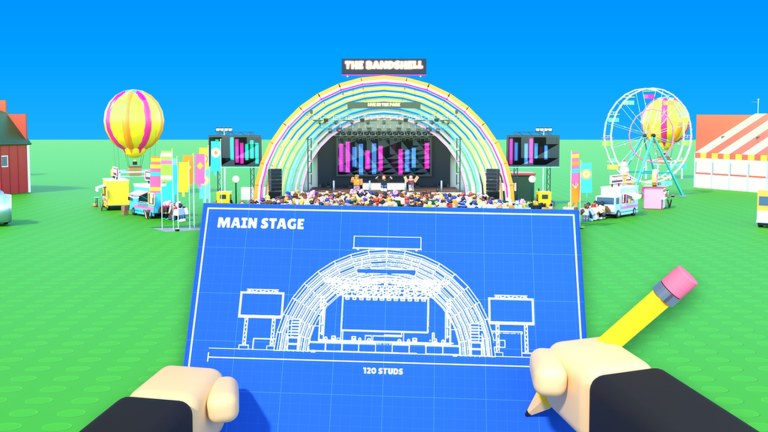
The Updates Hub tracks live changes in Festival Builder Tycoon so your builds, bookings, and décor plans stay current. Convicted_Orange launched the Simulation/Tycoon experience on 28 September 2026 (Place ID 76331960407574). Since then, content waves have expanded how you decorate and theme a plot—most notably the Galaxy Update, which deserves its own deep dive. Use this hub as the timeline index, then jump into detailed notes and related tier lists when a patch shifts priorities.
Festival Builder Tycoon still centers on building stages, food trucks, and paths; decorating; booking bands and DJs; running reactive light shows; raising guest happiness for five-star nights; chasing Festival of the Day; and visiting friends in servers capped at four players. Updates rarely replace that loop—they add toys, themes, and tools inside it.
Featured patch notes
Galaxy Update (featured)
The Galaxy wave introduced 31 new decorations, a full Galaxy theme, and giant festival name letters. It is the headline content drop for players who care about skyline identity and screenshot flex. Read the deep dive for placement strategy, then rebalance with the Decorations Tier List so vibe never blocks guest flow.
How to read each update on this wiki
For every major patch we aim to cover:
- What shipped — décor, themes, systems, or quality-of-life.
- What it changes in practice — booking, happiness, or build order.
- What to recheck — links to Stages, Decorations, Game Passes, and Tools.
- Codes impact — whether new promos appeared (see Codes; none active as of November 2026).
- Safety notes — ignore random “update scripts”; see Scripts.
Suggested post-update routine
- Skim in-game banners and this hub.
- Open a sandbox night on your plot; do not rebuild everything blind.
- Place new décor using A-tier discipline from the decorations list.
- Confirm paths to the main stage still read clearly under new props.
- Restagger band times if a new stage or plaza changed walk durations—schedule clashes remain a top pain point.
- Run the Tools night-prep checklist before inviting friends (Players).
- Recheck Codes and How to Redeem in case a promo launched with the patch.
Roadmap of pages to watch
| After this kind of update… | Recheck |
|---|---|
| New décor / themes | Decorations, Galaxy Update |
| Stage or lights changes | Stages |
| New monetization | Game Passes |
| New player systems | Players |
| Promo events | Codes |
| Onboarding tweaks | Getting Started |
Early-life context (launch → Nov 2026)
Because the game is young, expect frequent polish. That is normal for Roblox tycoons. Community tooling such as public scripts is still immature—our Scripts Hub intentionally warns that no established public scripts were found for this specific title. Progress with knowledge, not injectors.
Also remember naming collisions: tips labeled only “Festival Tycoon” may refer to Music Festival Tycoon or Chainsmokers Festival Tycoon. Prefer sources that cite Festival Builder Tycoon, Convicted_Orange, or Place ID 76331960407574. Official entry points live on Links.
Contributing mindset for readers
When you notice a patch we have not summarized yet, compare notes against your plot and the hubs above. This fan wiki prioritizes practical builder impact over marketing fluff. We will expand this Updates Hub with new child pages as future named drops arrive—the same way Galaxy earned a dedicated article.
Related hubs
- Wiki index — full site map
- Guides — evergreen how-tos
- Tier List — priority rankings after each wave
- Codes — promo status
- Links — official Roblox game and creator profile
Stay patch-aware, rebuild deliberately, and let each update feed happier guests—not clutter. Start with the Galaxy Update if you have not themed your skyline yet.
Frequently Asked Questions
Quick answers to the most common Festival Builder Tycoon questions.
What is the biggest update so far?
The Galaxy Update is the headline décor wave, adding 31 decorations, a Galaxy theme, and giant festival name letters. See its dedicated page for details.
Do updates usually add codes?
Sometimes Roblox games bundle promos with patches, but as of November 2026 Festival Builder Tycoon still has no active codes listed. Always recheck the Codes Hub after a drop.
Should I rebuild my whole festival after every patch?
No. Test new pieces in a controlled night, protect main paths, and only then expand themes. Use the Tools checklist before a full teardown.
Where can I verify official patch news?
Start with the in-game banners, the official Roblox game page, and the creator profile linked from our Links hub, then compare with this Updates Hub.