How to Redeem Festival Builder Tycoon Codes
Be ready the moment a verified promo string goes live.
This guide explains how to redeem codes in Festival Builder Tycoon once working promos exist, and where to watch so you never miss a drop. As of November 2026 there are no active codes, but Roblox tycoons often add a Codes or Rewards button after early patches. Use this page as your redemption playbook and keep the Codes Hub bookmarked for the live list.
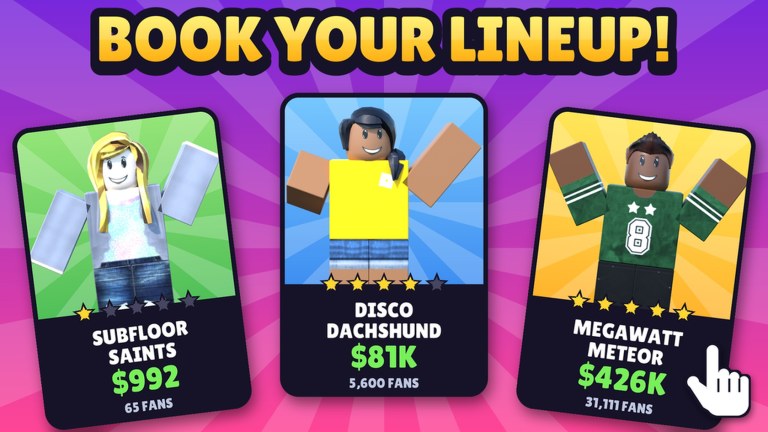
Festival Builder Tycoon is a Simulation/Tycoon experience by Convicted_Orange (Place ID 76331960407574). You build festival stages, food trucks, and guest paths; decorate for vibe; book bands and DJs; run reactive light shows; and chase guest happiness for five-star nights. Promo codes - when they arrive - usually accelerate that loop with cash, decor, or cosmetic extras. They are never required for free-to-play progress.
Before you redeem
- Confirm the code is for this game. Ignore lists for Music Festival Tycoon or Chainsmokers Festival Tycoon. Only strings verified for Festival Builder Tycoon belong here.
- Copy carefully. Many Roblox codes are case-sensitive. Prefer copy-paste over retyping.
- Play on an account you own. Never hand credentials to a third-party “auto redeem” site.
- Update the client. Join from the official Roblox game page so you are on the latest build after patches such as the Galaxy Update.
- Check the Codes Hub for active vs expired status before you spend time hunting a UI button.
Expected redemption flow (when codes go live)
Exact button labels can change with UI updates, but Festival Builder Tycoon is likely to follow the common Roblox tycoon pattern. When a Codes feature ships, use this sequence:
Step 1 - Launch the experience
Open Festival Builder Tycoon on Roblox and wait until your plot or festival lobby fully loads. Redemption UIs often appear only after the tutorial or first spawn completes.
Step 2 - Find the Codes / Rewards control
Look for a Codes, Rewards, Gift, or social-style button on the main HUD, shop panel, or settings menu. On mobile, open the full menu first; some buttons hide behind a hamburger or shop tab. If you cannot find it yet, the feature may simply not be enabled - return to the Codes Hub rather than installing shady plugins.
Step 3 - Open the redeem field
Tap or click the control to open a text box. Paste the active code exactly as listed. Avoid leading or trailing spaces. If the game shows a dropdown of social rewards, make sure you are in the free-text redeem field, not a different claim button.
Step 4 - Submit and confirm
Press Redeem, Claim, or Submit. A success toast should describe the reward (cash, decoration pack, cosmetic, and so on). Open your inventory, build menu, or currency HUD to verify the grant. If nothing appears, rejoin once and check again before assuming failure.
Step 5 - Log what you claimed
Especially during busy update weeks, note which codes you already used. Most Roblox codes are one redeem per account. Sharing a screenshot of a success message helps friends, but never share account cookies.
Troubleshooting failed codes
| Symptom | Likely cause | What to try |
|---|---|---|
| Invalid / wrong code | Typo, wrong game, or fake list | Re-copy from Codes Hub; confirm game name |
| Already redeemed | One use per account | Skip; check for newer codes |
| Expired | Time-limited drop | Move the string to your mental “expired” list |
| No Codes button | Feature not live yet | Keep playing; recheck after Updates |
| Reward missing | UI lag or server hitch | Rejoin; verify currency/inventory |
If a code works for friends but not for you, confirm you are on the same place version and that your account is not restricted. Platform-wide Roblox outages can also block reward grants temporarily.
Where to watch for new codes
New strings usually appear around content drops and creator announcements. Prioritize these sources:
- In-game patch notes and banners after updates - start at the Updates Hub and the Galaxy Update deep dive for how major decor waves are announced.
- Creator profile - Convicted_Orange on Roblox (linked from Links). Profile shout-outs and group posts often carry promo text.
- This wiki’s Codes Hub - we only publish codes after verification; we do not invent placeholders.
- Trusted community posts that explicitly say Festival Builder Tycoon. Skip generic “festival tycoon codes 2026” videos that mix multiple games.
When a drop lands, redeem early. Popular Roblox codes can expire quickly or hit claim caps.
What to do with rewards
Spend currency on build stages, paths, and food trucks that raise throughput before cosmetics. If you receive decorations, compare them against the Decorations Tier List - Galaxy set pieces can spike vibe, while core comfort props still drive guest appeal. Stage upgrades should follow the Stages Tier List so your main stage and reactive lights stay ahead of side stages. Optional Game Passes remain just that - optional - if a code already covered a cosmetic need.
Pair redemption day with the Tools night-prep checklist so new items actually improve guest happiness instead of cluttering the plot. If you visit friends in a max 4-player server, see Players for etiquette before rearranging shared spaces.
Safety and scam avoidance
- Redeem only inside the official Roblox client and the game UI.
- Never download an “executor,” injector, or code generator to claim rewards - read Scripts for why that risks bans.
- Ignore DMs that ask you to “verify” on an off-site form.
- This wiki will never ask for your password.
Related reading
- Codes Hub - live status (none active as of Nov 2026).
- Getting Started - early objectives without waiting on promos.
- Guides Hub - deeper build and booking help, including schedule clash tips.
- Wiki index - map of every hub.
Stay patient, keep the redemption steps handy, and return here whenever the Codes Hub flips from “none active” to a filled rewards table.
Frequently Asked Questions
Quick answers to the most common Festival Builder Tycoon questions.
Can I redeem codes right now?
There are no active Festival Builder Tycoon codes as of November 2026. When codes appear, use the in-game Codes or Rewards UI and the steps on this page.
Where is the Codes button?
When enabled, look on the main HUD, shop, or settings menu for Codes, Rewards, or Gift. If you cannot find it, the feature may not be live yet - check the Codes Hub and Updates pages.
Why did my code say invalid?
Common causes are typos, expired drops, codes meant for a different festival game, or extra spaces. Copy from the Codes Hub and confirm the game name matches.
Are code websites safe?
Only redeem inside Roblox. Avoid sites that ask for your password, cookie, or an executor download. Those are scam or ban risks.
Do redeemed rewards carry across devices?
Rewards grant to your Roblox account. Sign into the same account on phone, tablet, or PC to see cash, items, or cosmetics after a short sync or rejoin.